
SMS Opt-In
Opt in to CommonGround text messages
Enter your details and check the box below to receive text messages from CommonGround (Cash Rent Inc). The box is unchecked by default, and you can submit this form without opting in.
Last modified: September 19, 2026
This page shows how you give CommonGround, operated by Cash Rent Inc, permission to send you text messages. We only text people who actively check the SMS consent box on one of the forms below. The box is never pre-checked, and you can create an account or use CommonGround without checking it.
The consent box
Every form on commonground.io that asks for a mobile phone number shows the same, separate consent box directly under the phone number field. It reads:
I agree to receive text messages from CommonGround (Cash Rent Inc) about my account, my Cash Rent Estimate, listings I follow, and documents awaiting completion. Message frequency varies. Message and data rates may apply. Reply STOP to opt out, HELP for help. Consent is not required to use CommonGround. See our SMS Policy and Privacy Policy.
Checking the box and submitting the form is the action that gives consent. Leaving it unchecked means we will not text you.
Where you can opt in
1. Right here, on this page
Fill in the form at the top of this page, check the SMS consent box and choose Submit. Submitting without checking the box saves your details but does not opt you in to text messages.
2. Creating an account while generating a Cash Rent Estimate
- Visit commonground.io/cashrentstimate, enter your land's address and answer the short questions about your land.
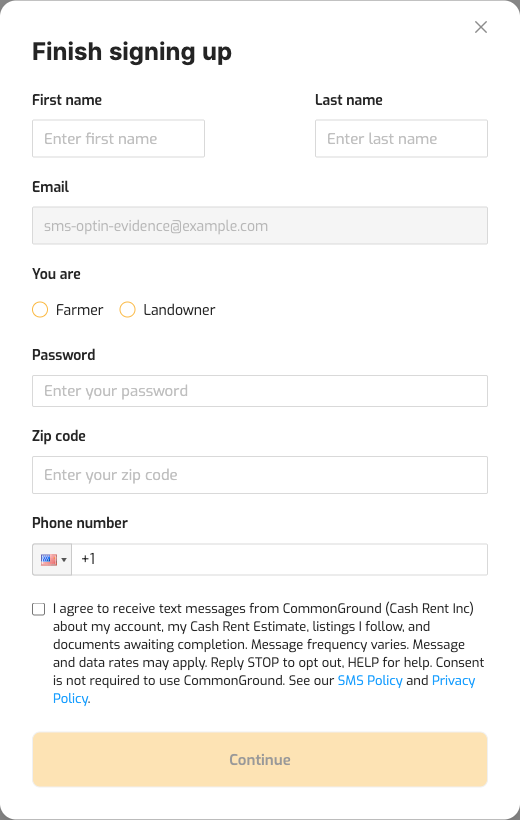
- To view your Cash Rent Estimate (Ground Value Report) you create a CommonGround account: enter your email address, then complete the Finish signing up form with your name, zip code and mobile phone number.
- The SMS consent box appears under the phone number field. Check it if you want to receive text messages; leave it unchecked if you do not.
3. Creating an account from the site header
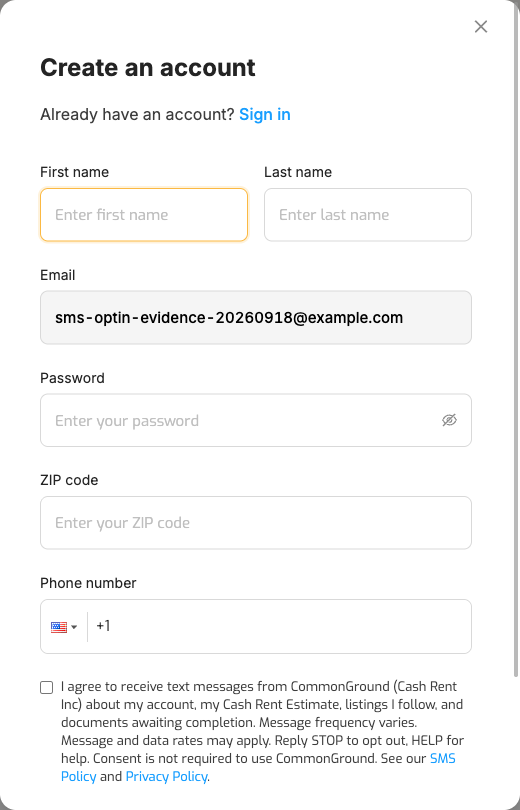
- Choose Login in the site header, enter your email address and choose Continue. New visitors are taken to the Create an account form (name, email, password, zip code, mobile phone number).
- The SMS consent box appears under the phone number field, unchecked by default.
What you receive, and how to stop
Messages come from CommonGround (Cash Rent Inc) and cover the topics listed in the consent box: follow-ups about your Cash Rent Estimate, replies to your questions, and notifications about your account, listings, or documents awaiting completion. We do not send marketing texts. Message frequency varies. Message and data rates may apply.
- Reply STOP to any message to opt out at any time.
- Reply HELP for assistance, or email help@commonground.io.
- Carriers are not liable for delayed or undelivered messages.
Your consent is given to Cash Rent Inc (CommonGround) only. No mobile information will be shared with third parties or affiliates for marketing or promotional purposes. All the above categories exclude text messaging originator opt-in data and consent; this information will not be shared with any third parties.
See our SMS Policy and Privacy Policy.